Hardware + IA, trabajando juntos
Paean Pal captura tus momentos. La IA los entiende al instante en todos tus dispositivos.

Usuarios avanzados, alegraos
Accede a las mismas capacidades de IA desde tu terminal. Canaliza, programa y automatiza.
  ──────────────────────────
 │  Paean Agent CLI v0.1.29   │
  ──────────────────────────
Herramientas locales, inteligencia en la nube
Configura servidores MCP para dar a Paean acceso a tu sistema de archivos, APIs y más.
{
  "mcpServers": {
    "paean-cloud": {
      "url": "wss://mcp.paean.ai",
      "auth": "oauth2"
    }
  }
}See the Chaos, Sorted
AI recognizes images, videos, documents and more through multimodal understanding, then organizes them intelligently.
Voice to Code, Seamlessly
Speak your intent—AI orchestrates local dev tools like Claude Code, Cursor, and Codex to update your codebase while keeping all data on your machine.

"Update the features from today's meeting and push to main"
See Something, Save Everything
Capture a whiteboard, document, or scene—AI instantly understands and records it with context from your ongoing conversations.
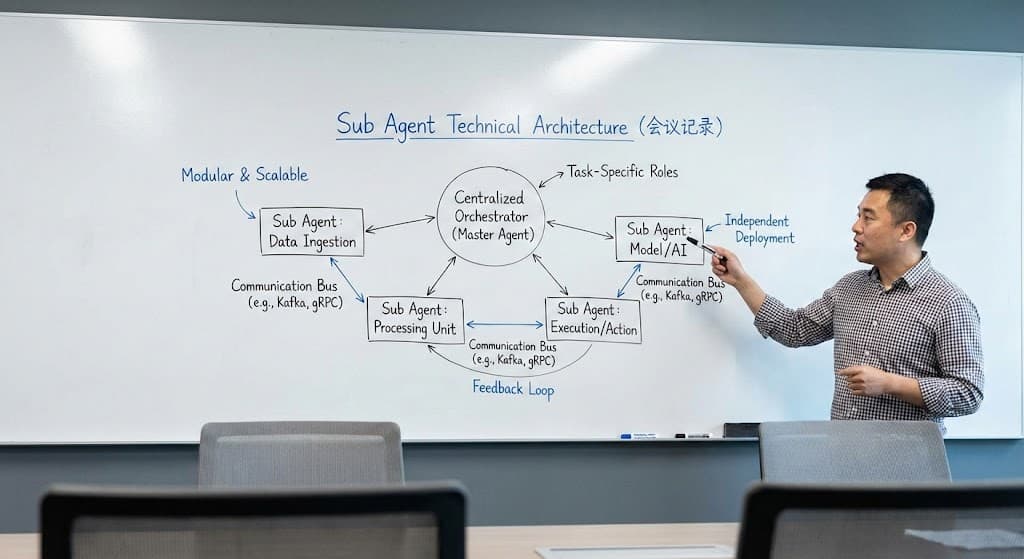
I've analyzed the whiteboard content. This is a Sub Agent Technical Architecture diagram showing a centralized orchestrator pattern with data ingestion, processing, and execution components.
I've saved this architecture diagram to your notes, along with the context from today's meeting recording.
Speak, Let AI Handle the Rest
Long-press and speak your request. AI organizes, queries, and updates your tasks automatically.
"帮我整理一下上周关于线下门店相关的项目进展"