원활한 통합
하드웨어 + AI, 함께 작동
Paean Pal이 당신의 순간을 포착합니다. AI가 모든 기기에서 즉시 이해합니다.

00:00
READY
app.paean.ai
实时转写
正在监听音频...
명령줄
파워 유저 여러분, 기뻐하세요
터미널에서 동일한 AI 기능에 액세스하세요. 파이프, 스크립트, 자동화.
Terminal — paean - zsh
  ──────────────────────────
 │  Paean Agent CLI v0.1.29   │
  ──────────────────────────
➜~❯ paean "
Check Paean App project status
모델 컨텍스트 프로토콜
로컬 도구, 클라우드 인텔리전스
MCP 서버를 구성하여 Paean에 파일 시스템, API 등에 대한 액세스를 제공합니다.
云端服务器
{
  "mcpServers": {
    "paean-cloud": {
      "url": "wss://mcp.paean.ai",
      "auth": "oauth2"
    }
  }
}
File Organization
Desktop
Documents
Projects
paean "Organize my desktop files"
Terminal — MCP
文件整理
混乱一键归档
AI 通过多模态理解识别图片、视频、文档等内容,智能分类整理。
桌面 — 混乱文件
IMG_8847...
meeting_...
DSC_0234...
receipt_...
presenta...
VID_2026...
screensh...
invoice_...
birthday...
design_v...
contract...
family_e...
多模态 AI
桌面 — 已整理
协同编程
语音驱动,本地协作
说出你的想法—AI 调度本地开发工具如 Claude Code、Cursor 和 Codex 更新你的代码库,所有数据均在本地处理。

"把今天会议提到的功能更新一下,然后推送到 main 分支"
Terminal — Paean CLI
one.paean.ai/tasks
无缝捕捉
所见即记录
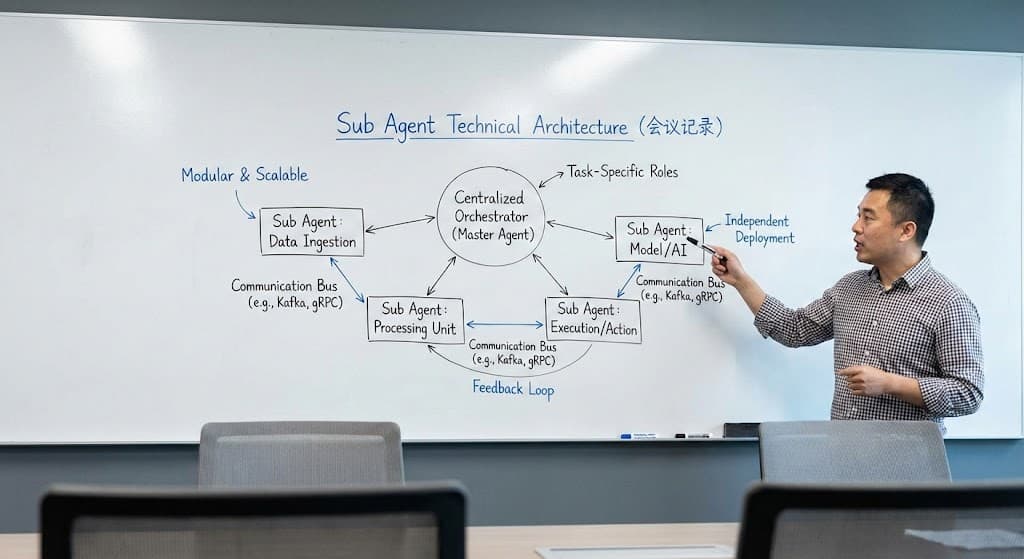
拍摄白板、文档或场景——AI 立即理解内容,并结合正在进行的对话上下文进行记录。
CAPTURED
app.paean.ai
Agent 对话
分析这块白板
∩
Paean AI我已分析白板内容。这是一个 Sub Agent 技术架构图,展示了采用数据采集、处理和执行组件的中央编排器模式。
关联录音
Save Note
已将此架构图保存至您的笔记,并关联了今日会议录音的上下文。
语音控制
开口即达
长按发送语音指令。AI 自动整理、查询并更新您的任务。
RECORDING
"帮我整理一下上周关于线下门店相关的项目进展"
∩
Paean AI